What Is The Domain Name System (DNS)?
The Domain Name System (DNS) is a global naming service that connects human-readable domain names, such as example.com, with IP (Internet Protocol) addresses. IP addresses are the numerical addresses used by computers to locate and communicate with servers and devices on a network. DNS therefore allows browsers, email services, and other internet services to find the correct server or resource connected to each domain name. DNS is described as the internet’s phonebook because it looks up domain names and returns the addresses needed to reach them, which improves user experience by letting people access websites through memorable domain names instead of long numerical strings.
DNS was invented by Paul Mockapetris in 1983 at the University of Southern California’s Information Sciences Institute (USC ISI), with administrative support from Jon Postel. DNS was introduced to replace the growing and difficult-to-manage HOSTS.TXT file system, which stored mappings between hostnames and IP addresses on individual computers. As the internet expanded, the HOSTS.TXT file system's centralized approach became inefficient, making a distributed naming system necessary.
What Are The Different Types Of DNS?
Types of DNS refer to the different DNS server roles that work together to locate the correct IP address connected to a domain name during a DNS lookup. These roles work together to receive a domain name request, find the relevant DNS records, and return the information needed to reach the correct server or resource. The 2 types of DNS are authoritative DNS and recursive DNS.
What Is The Authoritative DNS?
Authoritative DNS is a type of DNS server role that stores the official DNS records for a domain and provides the final answer to DNS queries. It serves as the official source for a domain’s DNS information including the records that control where the domain’s website, email, aliases, and verification details point. When a recursive DNS server requests information about a domain, the authoritative DNS returns the corresponding DNS record so the requested service or website reaches the correct destination.
What Is The Recursive DNS?
Recursive DNS is a type of DNS server role that receives a user's DNS query and locates the requested IP address on the user's behalf. It begins the DNS lookup process by checking its cache for an existing answer. If no cached record exists, it queries the DNS hierarchy by communicating with the root nameserver, top-level domain (TLD) nameserver, and authoritative DNS server until it obtains the correct DNS record. It then returns the result to the user's browser and temporarily stores the response according to its time-to-live (TTL) value, making future lookups for the same domain faster.
How Does DNS Work?
DNS works by following a sequence of requests and responses that translates a domain name into its corresponding IP address before a web browser connects to a website. This DNS lookup process involves six steps.
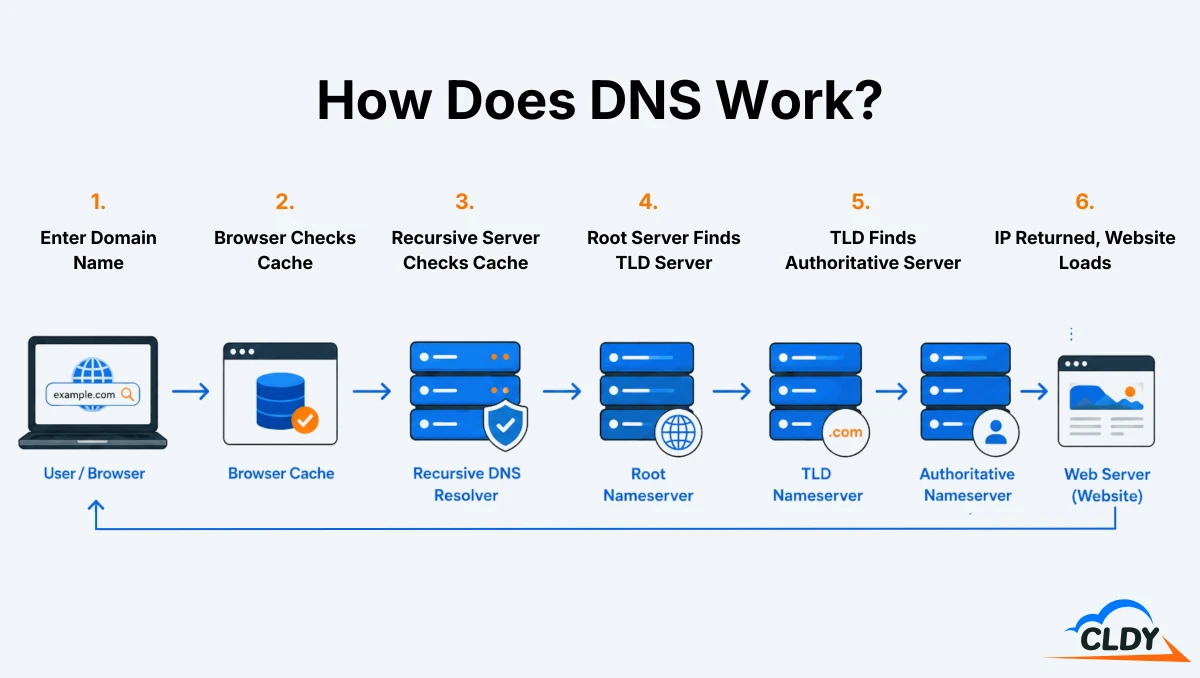
First, a visitor enters a domain name into a web browser or selects a link. The browser first checks its local DNS cache for a previously stored IP address. If no valid record exists, it sends the DNS query to a recursive DNS server. Second, the recursive DNS server checks its own cache for the requested domain. If the record is unavailable, it forwards the request to a root nameserver. The root nameserver identifies the appropriate top-level domain (TLD) nameserver, such as .com, .net, or .org, and directs the recursive DNS server to that destination.
Third, the recursive DNS server then queries the TLD nameserver for the requested domain. The TLD nameserver responds with the location of the domain's authoritative DNS server. The recursive DNS server sends the request to the authoritative DNS server, which returns the official DNS record containing the domain's IP address.
Fourth, after receiving the IP address, the recursive DNS server stores the result in its cache according to the record's time-to-live (TTL) value and returns the IP address to the visitor's browser. Fifth, the browser then establishes a connection with the destination web server using that IP address and sends an HTTP or HTTPS request for the website. Finally, the web server processes the request and returns the website files, allowing the browser to render the requested webpage for the visitor.
What Are DNS Records?
DNS records are instructions stored in the record area of a domain (known as its DNS zone) that define how a domain and its services are directed across the internet. Each DNS record stores specific information that helps DNS route website traffic, email messages, and other domain-related requests to the correct destination.
7 common DNS records are A (Address), AAAA (Quad A), CNAME (Canonical Name), MX (Mail Exchange), TXT (Text), NS (Name Server), and SOA (Start of Authority).
An A record is a DNS record that stores an IPv4 address for a domain. It maps a domain name to that IPv4 address, directing visitors to the web server that hosts the website. IPv4 (Internet Protocol Version 4) address is a 32-bit numerical address used to identify a device or server on an IP network. AAAA record is a DNS record that stores an IPv6 address for a domain. It maps a domain name to that IPv6 address, serving the same purpose as an A record for networks that use IPv6. IPv6 (Internet Protocol Version 6) address is a 128-bit address used to identify a device or server on an IP network CNAME record is a DNS record that defines an alias for a domain or subdomain. It points one domain name to another domain name instead of directly to an IP address. MX record is a DNS record that specifies the mail servers for a domain. It identifies which server receives email messages and sets the priority order when multiple mail servers exist. TXT record is a DNS record that stores text-based information for a domain. It holds data such as SPF (Sender Policy Framework), DKIM (DomainKeys Identified Mail), and DMARC (Domain-based Message Authentication, Reporting, and Conformance) policies that help verify legitimate email senders and reduce email spoofing. NS record is a DNS record that lists the authoritative nameservers for a domain. It directs DNS queries to the servers that store the domain's official DNS records. SOA record is a DNS record that contains administrative information about a DNS zone. It identifies the primary authoritative nameserver and stores details such as the zone's serial number, refresh interval, retry interval, expiration time, and default time-to-live (TTL) value used during DNS synchronization.
What Is DNS Propagation?
DNS propagation is the process of distributing updated DNS records across DNS servers worldwide after changes are made to a domain's DNS configuration. It occurs when recursive DNS servers refresh their cached DNS records and retrieve the latest information from the authoritative DNS server, ensuring users reach the correct website, email server, or online service.
DNS propagation time refers to the amount of time it takes for DNS changes to update across DNS servers and networks worldwide. This delay usually takes anywhere from a few minutes to 48 hours, although most DNS changes are visible within a few hours. DNS propagation time depends on factors such as the record's time-to-live (TTL) value, the caching behavior of recursive DNS servers, and how frequently internet service providers refresh their DNS caches. During this period, some users reach the updated destination while others continue accessing the previous DNS records until their cached information expires.
Why Is DNS Important?
DNS is important as it connects human-readable domain names with the IP addresses that computers use to communicate across the internet. This translation process makes the internet user-friendly and ensures digital services remain accessible by directing requests to the correct destinations. DNS supports many of the internet's core functions beyond loading websites. It directs visitors to web hosting servers, routes email messages to the correct mail servers, and links domain names with their corresponding IP addresses. DNS also supports internet security when combined with protections such as DNSSEC, DNS filtering, and secure DNS configuration.
What Is The Role Of DNS In Web Hosting?
The role of DNS in web hosting is to direct a domain name to the web hosting server where the website content lives. Web hosting is a service that stores website files, databases, and other resources on a server connected to the internet, allowing visitors to access hosted websites through a web browser.
DNS performs this role by linking a domain name to the IP address assigned to the hosting server through DNS records. When a visitor enters a domain name into a browser, DNS retrieves the corresponding IP address and directs the browser to the correct hosting server. The web server then delivers the requested website files, allowing the webpage to load.
What Is The Role Of DNS In Email?
The role of DNS in email is to direct email messages to the correct mail server while confirming that the sender is authorized to send messages on behalf of a domain. Email is an electronic messaging system that exchanges digital messages between users across computer networks and the internet.
DNS performs this role through MX records, which identify the mail servers responsible for receiving email messages, and TXT records, which store SPF, DKIM, and DMARC policies used to verify sender identity. These DNS records help deliver email to the intended recipient while reducing spoofing and other forms of email abuse.
What Is The Role Of DNS In Domain Name?
The role of DNS in domain name is to make a domain name usable as the public-facing address for a website or online service. A domain name gives individuals, businesses, and organizations a readable address that reflects their name, brand, or purpose and makes it easier for customers and readers to find them online.
DNS performs this role by checking the DNS records associated with the domain name and returning the information needed to reach the correct server or resource. For websites, this usually means returning the IP address of the web server so the user’s browser connects to it and loads the requested site.
Is DNS Security Important?
Yes, DNS security is extremely important. It protects the DNS lookup process from attacks that attempt to manipulate DNS responses and redirect users to fraudulent destinations. Singapore's Cyber Security Agency (CSA) includes DNS Security Extensions (DNSSEC) as part of its national internet hygiene baseline for .sg domains. DNSSEC acts as a cryptographic digital passport for .sg domains that ensures the IP addresses visitors receive actually belong to the website to protect users from DNS spoofing and cache poisoning. Without DNS security, attackers exploit weaknesses in DNS to impersonate legitimate websites, intercept sensitive information, and disrupt access to online services.