What Is cPanel In Web Hosting?
Web hosting is the service that provides the server space, computing resources, and internet connectivity so a website is able to be stored and accessed online. cPanel in web hosting refers to a popular control panel developed by cPanel, L.L.C., that is used to manage a web hosting account. Such web hosting control panels act as the central management system for hosting accounts.
cPanel provides an intuitive graphical dashboard for managing the technical parts of a web hosting account, such as website files, domains, email accounts, databases, backups, security settings, and software installations. Users interact with cPanel through icons, menus, and forms instead of manually inputting complicated code or terminal commands. Using cPanel makes routine management tasks faster, reduces errors, and allows both beginners and experienced website owners to manage their hosting environments efficiently.
What Is cPanel Hosting?
cPanel hosting refers to a type of web hosting service that includes cPanel as the web hosting control panel used to manage the hosting account. When a hosting provider offers cPanel hosting, it means clients will access their server environment through the cPanel interface. cPanel web hosting plans typically include one or multiple cPanel licenses for free, depending on the plan tier.
Is cPanel the same as web hosting? No, cPanel is not the same as web hosting. Web hosting is the overall service that provides the server space, resources, internet connectivity, and software to store and deliver a website so that it becomes accessible online. cPanel is one component of the web hosting setup, and refers to the control panel that certain web hosts (cPanel web hosts) provide to help clients manage their accounts.
How Does cPanel Work In Web Hosting?
cPanel works in web hosting by functioning as a bridge between the user and the server environment. cPanel only works on Linux-based web hosting servers, which means web hosting providers must run a compatible Linux distribution for cPanel to function. cPanel then works as a control layer that translates user actions into operations on the Linux server. There are three important ways cPanel performs this role in web hosting.
Firstly, cPanel connects a user-friendly interface to the server’s backend processes. When users perform an action such as uploading a file, creating an email account, or setting up a database, cPanel translates that action into system-level commands executed on the server. This removes the need to manually configure services through command-line tools while still maintaining control over hosting features.
Secondly, access to cPanel is entirely web-based. This means users log into cPanel through a browser using a secure URL provided by their hosting provider, typically over HTTPS. Once inside the cPanel dashboard, all tools are organized into sections such as files, email, domains, and security. This structure allows users to manage their hosting account from any device with internet access and without installing additional software.
Finally, cPanel supports integration with third-party tools and services, which expands its functionality beyond basic server management. cPanel connects with application installers like Softaculous for one-click installations, security tools for malware scanning, and backup systems for automated data protection. These integrations allow web hosting providers to offer extended features while keeping everything accessible within a single interface.
How Is cPanel Used In Web Hosting?
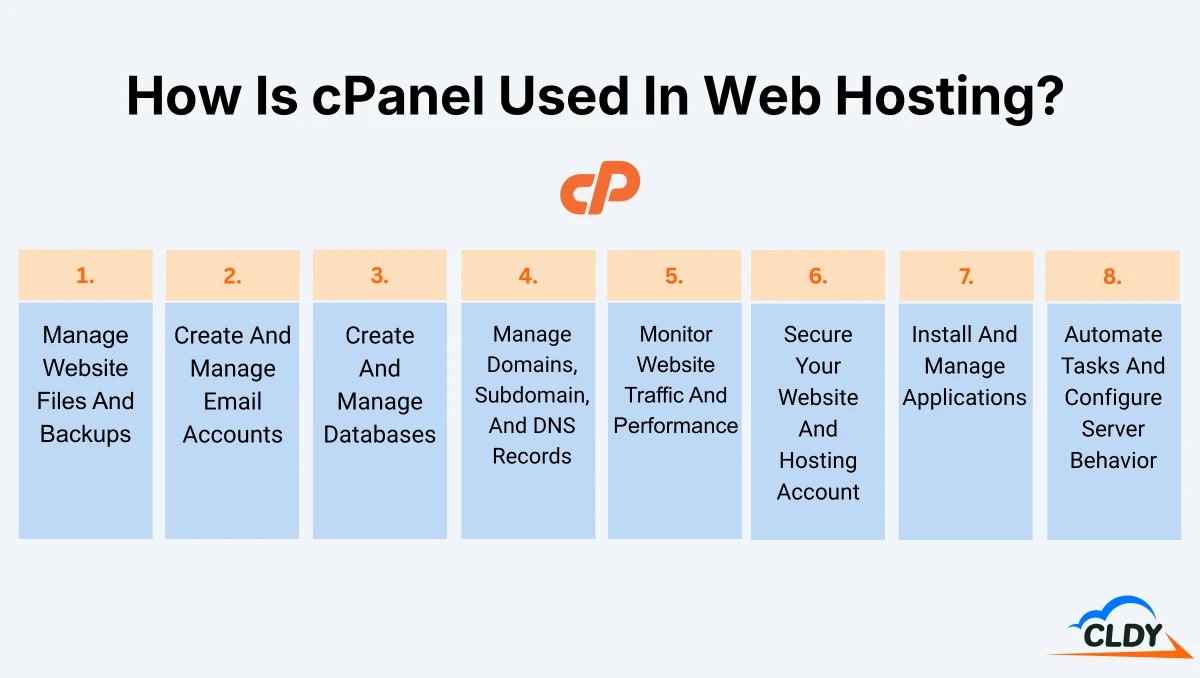
cPanel is used in web hosting to control and manage every part of a hosting account from a single dashboard. Each tool inside cPanel corresponds to a specific hosting function, making it easier to perform both routine tasks and advanced configurations.
The 8 main ways cPanel is used in web hosting are listed below.
- Manage Website Files And Backups
- Create And Manage Email Accounts
- Create And Manage Databases
- Manage Domains, Subdomains, And DNS Records
- Monitor Website Traffic And Performance
- Secure Your Website And Hosting Account
- Install And Manage Applications
- Automate Tasks And Configure Server Behavior
Manage Website Files And Backups
Managing website files and backups refers to uploading, editing, organizing, transferring, and protecting the files that make up a hosted website. The 8 main cPanel tools used to manage website files and backups are listed below.
- File Manager: File Manager on cPanel opens a browser-based file system where users upload, edit, delete, and organize website files.
- FTP Accounts: FTP Accounts on cPanel opens a browser-based file system where users upload, edit, delete, and organize website files.
- Disk Usage: Disk Usage on cPanel shows how storage space is distributed across files and directories.
- Web Disk: Web Disk on cPanel connects the hosting account to a local computer as a network drive for file management.
- Backup: Backup on cPanel allows manual download or generation of full or partial backups.
- Backup Wizard: Backup Wizard on cPanel guides users step-by-step through creating or restoring backups.
- Directory Privacy: Directory Privacy on cPanel restricts access to specific folders using password protection.
File Manager is most commonly used in cPanel to manage website files and backups.
Create And Manage Email Accounts
Creating and managing email accounts refers to setting up custom email addresses, configuring email delivery, organizing incoming messages, and protecting email communication tied to a domain. The 15 main cPanel tools used to create and manage email accounts are listed below.
- Email Accounts: Email Accounts on cPanel creates and manages custom email addresses.
- Forwarders: Forwarders on cPanel redirects incoming emails to another address.
- Email Routing (MX Entry): Email Routing on cPanel controls where incoming email is delivered.
- Autoresponders: Autoresponders on cPanel send automatic replies to incoming emails.
- Default Address (Catch-All): Default Address on cPanel receives emails sent to invalid addresses under the domain.
- Mailing Lists: Mailing Lists on cPanel manages group email distribution.
- Track Delivery: Track Delivery on cPanel logs email delivery status to diagnose issues.
- Global Email Filters/Email Filters: Global Email Filters/Email Filters on cPanel creates rules to organize or block incoming messages.
- Email Deliverability (SPF/DKIM/DMARC): Email Deliverability on cPanel configures authentication records to improve email trust and reduce spam filtering.
- Address Importer: Address Importer on cPanel bulk uploads email accounts or forwarders.
- Spam Filters (SpamAssassin): Spam Filters on cPanel detects and filters unwanted messages.
- Encryption (GnuPG/OpenPGP Keys): Encryption on cPanel adds encryption for secure email communication.
- BoxTrapper: BoxTrapper on cPanel uses challenge-response verification to block spam.
- Calendars and Contacts: Calendars and Contacts on cPanel syncs scheduling and contact data.
- Webmail (Roundcube): Webmail on cPanel provides browser-based access to email inboxes.
Email Accounts is most commonly used in cPanel to create and manage email accounts.
Create And Manage Databases
Creating and managing databases refers to setting up, organizing, accessing, and maintaining databases that store the content and structure of dynamic websites. The 7 main cPanel tools used to create and manage databases are listed below.
- MySQL Databases: MySQL Databases on cPanel creates and manages databases and assigns users.
- MySQL Database Wizard: MySQL Database Wizard on cPanel simplifies database setup through guided steps.
- phpMyAdmin: phpMyAdmin on cPanel provides a web interface to view, edit, and query MySQL databases.
- PostgreSQL Databases: PostgreSQL Databases on cPanel creates and manages PostgreSQL databases.
- PostgreSQL Database Wizard: PostgreSQL Database Wizard on cPanel guides setup for PostgreSQL environments.
- phpPgAdmin: phpPgAdmin on cPanel provides an interface to manage PostgreSQL databases.
- Remote MySQL: Remote MySQL on cPanel allows external servers to connect to a database.
MySQL Databases is most commonly used in cPanel to create databases and assign users with specific permissions.
Manage Domains, Subdomains, And DNS Records
Managing domains, subdomains, and DNS records refers to connecting domains, organizing website structures, and configuring DNS settings that direct traffic to the correct server resources. The 6 main cPanel tools used to manage domains, subdomains, and DNS records are listed below.
- Domains (Unified Management): Domains on cPanel manages primary domains, addon domains, and subdomains in one place.
- WordPress Toolkit: WordPress Toolkit on cPanel manages WordPress installations tied to domains.
- Sitejet Website Builder: Sitejet Website Builder on cPanel builds websites directly within cPanel.
- Redirects: Redirects on cPanel send users from one URL to another automatically.
- Zone Editor (DNS): Zone Editor on cPanel edits DNS records such as A, MX, and CNAME.
- Dynamic DNS: Dynamic DNS on cPanel updates DNS records automatically when IP addresses change.
Domains is most commonly used in cPanel to manage domains, subdomains, and DNS records.
Monitor Website Traffic And Performance
Monitoring website traffic and performance refers to tracking visitor activity, analyzing website usage, identifying server errors, and reviewing resource consumption. The 10 main cPanel tools used to monitor website traffic and performance are listed below.
- Visitors: Visitors on cPanel lists recent site visits and access details.
- Site Quality Monitoring: Site Quality Monitoring on cPanel tracks uptime and performance issues.
- Errors: Errors on cPanel displays server-side errors affecting the site.
- Bandwidth: Bandwidth on cPanel shows how much data is transferred over time.
- Raw Access: Raw Access on cPanel provides raw log files of website traffic.
- Awstats: Awstats on cPanel generates detailed traffic reports with charts and analytics.
- Webalizer: Webalizer on cPanel reports hits, visits, page views, referring sites, search strings, user agents (browsers), and countries.
- Webalizer FTP: Webalizer FTP on cPanel reports which users connected via FTP and what files were accessed.
- Analog Stats: Analog Stats on cPanel reports overall numbers, listing total pages visited, and reports data monthly rather than daily.
- Metrics Editor: Metrics Editor on cPanel enables or disables specific tracking tools.
Awstats is most commonly used in cPanel to monitor website traffic and performance.
Secure Your Website And Hosting Account
Securing a website and hosting account refers to protecting server access, encrypting data, preventing unauthorized activity, and detecting security threats. The 11 main cPanel tools used to secure websites and hosting accounts are listed below.
- SSH Access: SSH Access on cPanel enables secure command-line access to the server.
- IP Blocker: IP Blocker on cPanel restricts access from specific IP addresses.
- SSL/TLS: SSL/TLS on cPanel installs and manages encryption certificates.
- SSL/TLS Status: SSL/TLS Status on cPanel monitors certificate installation and validity.
- Manage API Tokens: Manage API Tokens on cPanel controls access for external applications.
- Hotlink Protection: Hotlink Protection on cPanel prevents other sites from using hosted files directly.
- Leech Protection: Leech Protection on cPanel limits repeated login attempts.
- ModSecurity: ModSecurity on cPanel provides a firewall for web applications.
- Two-Factor Authentication: Two-Factor Authentication on cPanel adds an extra layer of login security.
- ImunifyAV: ImunifyAV on cPanel scans for malware and threats.
- Security Policy: Security Policy on cPanel applies security rules to the account.
SSL/TLS Status is most commonly used in cPanel to secure a website and hosting account.
Install And Manage Applications
Installing and managing applications refers to deploying, configuring, updating, and maintaining website software, frameworks, and server-side tools. The 8 main cPanel tools used to install and manage applications are listed below.
- MultiPHP Manager: MultiPHP Manager on cPanel selects PHP versions for different domains.
- MultiPHP INI Editor: MultiPHP INI Editor on cPanel adjusts PHP configuration settings.
- PHP PEAR Packages/Perl Modules: PHP PEAR Packages/Perl Modules on cPanel installs programming extensions.
- Softaculous Apps Installer: Softaculous Apps Installer on cPanel is an automated software library that installs applications like WordPress with a few clicks.
- WordPress Manager by Softaculous: WordPress Manager by Softaculous on cPanel manages WordPress installations, updates, and security.
- Site Software: Site Software on cPanel installs additional server-side tools.
- Optimize Website: Optimize Website on cPanel enables compression for faster loading.
- Application Manager (Phusion Passenger): Application Manager on cPanel deploys applications built with frameworks like Node.js or Python.
Softaculous Apps Installer is most commonly used in cPanel to install and manage applications.
Automate Tasks And Configure Server Behavior
Automating tasks and configuring server behavior refers to scheduling recurring processes, controlling how servers handle files, and customizing system responses. The 7 main cPanel tools used to automate tasks and configure server behavior are listed below.
- Cron Jobs: Cron Jobs on cPanel schedules tasks such as backups or script execution at specific times.
- Track DNS: Track DNS on cPanel checks DNS propagation and resolution.
- Indexes: Indexes on cPanel controls how directory contents are displayed.
- Error Pages: Error Pages on cPanel customizes pages shown for server errors.
- Apache Handlers: Apache Handlers on cPanel defines how the server processes file types.
- MIME Types: MIME Types on cPanel specifies how files are interpreted by browsers.
- Terminal (SSH): Terminal on cPanel provides command-line access within the browser.
Cron Jobs is most commonly used in cPanel to automate tasks and configure server behavior.
Is cPanel Available In CLDY?
Yes, cPanel is available in CLDY. CLDY is a web hosting provider based in Singapore that offers cloud-based hosting solutions, including shared hosting, VPS (Virtual Private Server), and dedicated server environments needed to run websites online. cPanel is available in CLDY as the default control panel used to manage its hosting accounts. cPanel is included at no extra charge on its shared hosting and VPS plans. This lets CLDY customers easily deploy websites, configure services, and maintain their hosting account without needing high-level technical expertise or knowledge of command-line.
What Is The cPanel Alternative In Web Hosting?
A cPanel alternative in web hosting refers to a different control panel software used to manage a web hosting environment. cPanel alternatives perform the same core function of providing a graphical interface to control server settings, website files, email, and databases, but typically differ from cPanel in design, supported operating systems, and feature structure.
One cPanel alternative is Plesk. Plesk is a web hosting control panel that supports both Linux and Windows servers, unlike cPanel, which is limited to Linux-based environments. Plesk is therefore often used in hosting environments that require Windows compatibility. While both cPanel and Plesk serve the same purpose, the choice between them depends on your preferred operating system (OS), server type, hosting requirements, and user preference.
cPanel FAQs
Frequently asked questions (FAQ) on cPanel include its fee structure and its usability in WordPress hosting. Fee structure refers to the price of using cPanel software as a customer. Usability in WordPress hosting refers to whether cPanel is supported in WordPress hosting.
Is cPanel Free?
No, cPanel is not free. cPanel is licensed software, which means hosting providers must pay a fee to use it on their servers. For most web hosting customers, cPanel may feel free because it is bundled into the hosting plan rather than charged separately. cPanel’s licensing model is typically based on the number of accounts hosted on a server. Because of this, hosting providers bundle cPanel into their plans and present it as part of the overall service rather than a standalone product.
Is cPanel Used in WordPress Hosting?
Yes, cPanel is used in WordPress hosting. WordPress hosting refers to hosting that is optimized to support websites built using the WordPress platform. cPanel is commonly included in shared and managed WordPress hosting plans because it provides convenient tools needed to install, manage, and maintain WordPress websites, such as 1-click WordPress installers. Not all WordPress hosting uses cPanel. Certain providers offer custom dashboards or alternative control panels designed specifically for WordPress environments.