What Is an SSL Certificate?
An SSL (Secure Sockets Layer) certificate, also called a TLS (Transport Layer Security) certificate, is a digital certificate hosted on a website's origin server that encrypts the data transmitted between a user's web browser and the website's server. SSL certificates verify the identity of the website and enable an encrypted HTTPS (Hypertext Transfer Protocol Secure) connection to protect sensitive information, such as passwords, payment details, and personal data, from unauthorized access during transmission.
SSL certificates are used by businesses, eCommerce stores, banks, government agencies, educational institutions, healthcare organizations, and website owners that collect or transmit user information. These certificates help secure websites, build visitor trust, and comply with modern web security standards.
What Is SSL?
SSL (Secure Sockets Layer) is a cryptographic internet security protocol that encrypts data transmitted between a user's web browser and a web server. SSL was developed to protect sensitive information, such as passwords, payment details, and personal data, from interception while in transit over the internet. SSL has been replaced by TLS (Transport Layer Security) due to improved security, but the term "SSL" is still widely used to refer to website security certificates and encrypted HTTPS connections. As a result, modern TLS certificates are commonly known as SSL certificates.
How Do SSL Certificates Work?
SSL certificates work by establishing a secure connection between a client's web browser and a website's server before any data is exchanged. During this process, the website's identity is verified, and an encrypted communication channel is established to protect information transmitted between the browser and the server. The SSL certificate verification 4-step process is shown in the figure below.
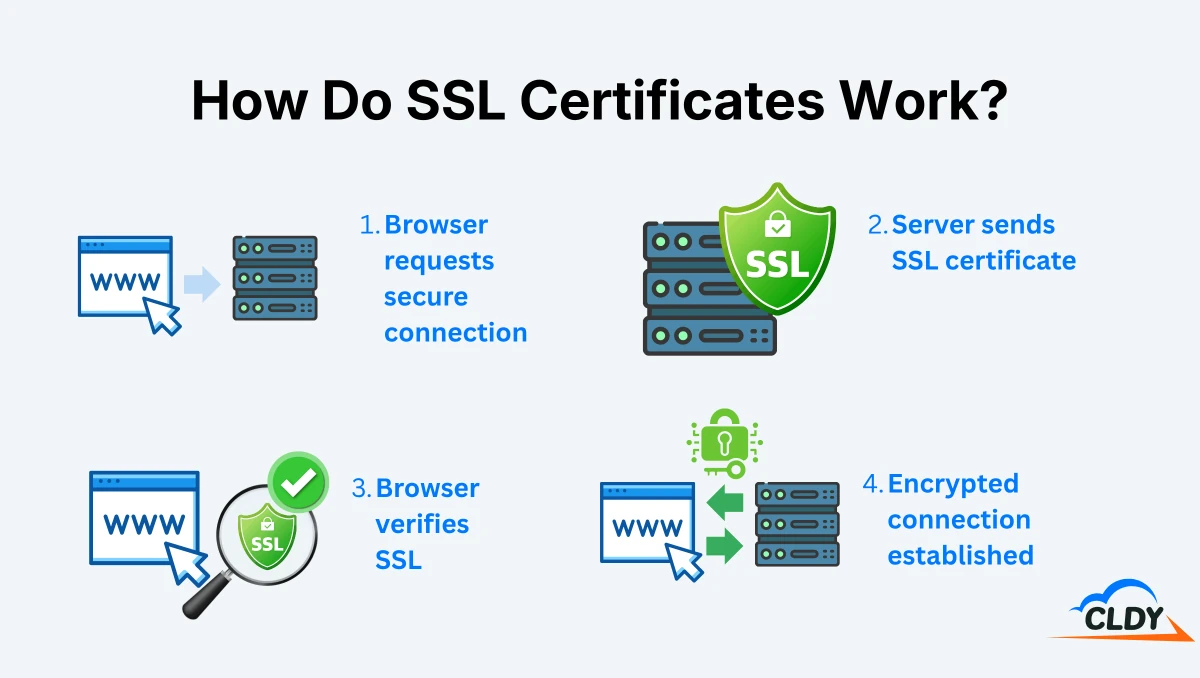
When a user visits an HTTPS-enabled website, the web browser sends a request to establish a secure session with the server. The server sends its SSL certificate to the browser, which checks that the certificate is valid, issued by a trusted Certificate Authority (CA), and matches the requested domain name. After the SSL certificate is verified, the browser and server perform an SSL/TLS handshake to agree on encryption keys and create a secure communication channel. All information transmitted between the browser and the server is encrypted to protect sensitive data from interception or tampering during transit.
What Are the Components of an SSL Certificate?
The 8 main components of an SSL certificate are listed below.
- Domain name: Domain name specifies the website that the SSL certificate is issued for.
- Organization or individual: Organization or individual specifies the entity to whom the SSL certificate is issued.
- Issuing Certificate Authority (CA): Issuing Certificate Authority specifies the trusted organization that issues the SSL certificate.
- Certificate Authority's digital signature: The Certificate Authority's digital signature confirms that the SSL certificate was issued by the stated CA and has not been modified.
- Associated subdomains: Associated subdomains specify the additional subdomains covered by the SSL certificate, where applicable.
- Date of issue: Date of issue specifies when the SSL certificate was issued.
- Expiration date: Expiration date specifies when the SSL certificate expires.
- Public key: Public key contains the public encryption key associated with the SSL certificate.
What Is an SSL Handshake?
An SSL handshake is the process that establishes a secure connection between a client's web browser and a website's server before any data is transmitted. The browser and server verify the website's SSL certificate, authenticate the server's identity, and agree on the encryption algorithms to use during the SSL handshake. The browser and server then generate secure shared session keys to encrypt all data transmitted during the connection. Once the SSL handshake is successfully completed, the browser and server begin exchanging encrypted data over the HTTPS connection.
Who Issues SSL Certificates?
SSL certificates are issued by Certificate Authorities (CAs), like DigiCert, Sectigo, GlobalSign, Let's Encrypt, and Google Trust Services. These CAs are trusted organizations responsible for verifying the identity of the certificate applicant and digitally signing the certificate. Web browsers and operating systems maintain lists of trusted certificate authorities to verify that an SSL certificate is genuine and issued by a recognized authority. The level of identity verification performed by the certificate authority depends on the type of SSL certificate being issued.
What Are the Different Types of SSL Certificates?
Different types of SSL certificates are categorized based on their validation level and domain coverage, which refers to the number of domains or subdomains protected by the certificate.
The 3 types of SSL certificates according to validation level are explained below.
- Domain Validation (DV) SSL certificates: Domain Validation (DV) SSL certificates verify that the applicant controls the domain name. DV SSL certificates are the fastest and most affordable type of SSL certificate and are suitable for personal websites, blogs, and small business websites.
- Organization Validation (OV) SSL certificates: Organization Validation (OV) SSL certificates verify both domain ownership and the identity of the organization requesting the certificate. OV SSL certificates are commonly used by businesses, nonprofits, and organizations that want to provide visitors with a higher level of trust.
- Extended Validation (EV) SSL certificates: Extended Validation (EV) SSL certificates perform a comprehensive identity verification before issuance. EV SSL certificates are typically used by banks, financial institutions, government agencies, and large organizations that require the highest level of identity assurance.
The 3 types of SSL certificates according to domain coverage are explained below.
- Single-domain SSL certificates: Single-domain SSL certificates protect one fully qualified domain name, such as www.example.com. These domain SSL certificates are suitable for websites that operate under a single domain.
- Multi-domain SSL certificates: Multi-domain SSL certificates protect multiple domain names under a single certificate using the Subject Alternative Name (SAN) extension. For example, a single SSL certificate can protect example.com, example.net, and example.org. These domain SSL certificates are suitable for organizations that manage multiple websites with different domain names.
- Wildcard SSL certificates: Wildcard SSL certificates protect one domain and all of its first-level subdomains, such as example.com, blog.example.com, and shop.example.com. These domain SSL certificates are suitable for websites that host multiple subdomains under the same primary domain.
What Is SSL Certificate Validation Level?
SSL certificate validation level is the degree of identity verification that a Certificate Authority (CA) performs before issuing an SSL certificate. This validation level tells how thoroughly the applicant's identity is verified and how much trust the certificate provides to website visitors.
There are 3 SSL certificate validation levels that include domain validation (DV), organization validation (OV), and extended validation (EV). DV verifies domain ownership only. OV verifies both domain ownership and the organization's identity. EV performs a comprehensive verification of the organization before issuing the certificate.
What Is a Self-Signed SSL Certificate?
A self-signed SSL certificate is a public key SSL certificate that is created and signed by the website owner instead of a trusted Certificate Authority (CA). A self-signed SSL certificate provides data encryption between the web browser and the server but does not verify the website's identity through an independent trusted authority. Self-signed SSL certificates are commonly used for internal networks, development environments, and testing purposes. These SSL certificates are not recommended for public websites because web browsers cannot verify their authenticity and typically display security warnings to visitors.
Why Are SSL Certificates Important?
SSL certificates are important for four main reasons. The first is that they protect website users from data theft. Websites often collect login credentials, payment details, contact information, and other personal data. An SSL certificate enables HTTPS encryption, which prevents intercepted information from being easily read or misused. The Infocomm Media Development Authority (IMDA) and the Cyber Security Agency of Singapore (CSA) encourage the use of secure HTTPS websites, particularly for sites that accept login credentials or other sensitive information.
The second reason is that SSL certificates reduce the risk of website impersonation. An SSL certificate authenticates the domain connected to a web server and helps browsers verify that users have reached the intended website. This authentication makes it more difficult for attackers to pose as a legitimate Singaporean business and collect information from its customers.
The third reason is that SSL certificates strengthen visitor trust. Most browsers warn users when a website is not using a HTTPS connection. These warnings can cause visitors to leave the website, avoid submitting forms, or abandon online purchases.
The fourth reason is that SSL certificates help Singaporean businesses protect personal data and follow national cybersecurity guidance. Singapore’s Personal Data Protection Act (PDPA) requires organizations to make reasonable security arrangements to protect personal data from unauthorized access, collection, use, disclosure, modification, and loss. HTTPS encryption supports these arrangements by protecting personal data while it travels between a website and its users. The Cyber Security Agency of Singapore’s Safer Cyberspace Masterplan also encourages organizations to strengthen website security through measures such as HTTPS encryption and secure website configuration.
What Happens If My SSL Certificate Expires?
If your SSL certificate expires, your website is no longer able to establish a trusted HTTPS connection with your visitors. Web browsers display security warnings showing that the website's connection is not secure, which discourages users from accessing your site and reduces customer trust. An expired SSL certificate also leaves data transmitted between the browser and the server without a valid trusted certificate, which increases security risks for users. SSL certificates must be renewed before their expiration date to avoid website warnings, service disruptions, and loss of visitor confidence.
How Much Do SSL Certificates Cost?
SSL certificates cost between $0 and over $1,000 per year, depending on the validation level, Certificate Authority (CA), warranty, and included features. The cost of SSL certificates also varies according to whether the certificate protects a single domain, multiple domains, or all subdomains under one domain. Domain Validation (DV) certificates are the most affordable SSL certificates because they verify only domain ownership instead of performing organizational identity checks. Organization Validation (OV) and Extended Validation (EV) certificates cost more due to their additional verification requirements. There are also free SSL certificate authorities like Let's Encrypt and ZeroSSL that provide the same data encryption as paid options
Can I Use a Free SSL Certificate for My Website?
Yes, you can use a free SSL certificate for your website if domain validation is sufficient for your security requirements. Free SSL certificates provide the same level of data encryption as paid SSL certificates and are suitable for blogs, portfolios, personal websites, and small business websites. Free SSL certificates verify only domain ownership and do not validate the identity of the website owner. Businesses that require organizational identity verification, extended validation, warranty coverage, or dedicated CA support need a paid SSL certificate.
SSL Certificate FAQs
Frequently Asked Questions (FAQs) about SSL certificates include certificate authenticity, free SSL availability, the effect of SSL on website speed, HTTPS setup, and solutions for “Not Secure” browser warnings.
Can SSL Certificates Be Faked or Spoofed?
Yes, SSL certificates can be faked or spoofed through self-signed certificates, compromised Certificate Authorities (CAs), or fraudulently issued certificates. Modern web browsers verify SSL certificates against trusted CAs and typically warn users or block connections if a certificate is invalid, untrusted, or does not match the website's domain. Users should always verify the website's domain name and heed browser security warnings before entering sensitive information.
Does CLDY Offer A Free SSL Certificate?
Yes, CLDY offers a free SSL certificate with its web hosting plans. CLDY’s FreeSSL certificate secures your website with HTTPS, while Business Web Hosting also includes SSL monitoring and HTTPS conversion.
Do SSL certificates slow down my website?
No, SSL certificates do not slow down modern websites. HTTPS encryption adds a small amount of processing during the initial SSL/TLS handshake that modern web servers, browsers, and processors complete in milliseconds. HTTPS-enabled websites perform as well as or better than HTTP websites because modern protocols such as HTTP/2 and HTTP/3 are designed to work efficiently over secure connections.
How Do I Ensure My Website Uses HTTPS?
Ensure your website uses HTTPS by installing a valid SSL certificate and configuring your web server to redirect all HTTP traffic to HTTPS. After installation, verify that the SSL certificate is active, update internal links and resources to use HTTPS, and enable automatic certificate renewal where possible. Most web hosting providers also offer tools to force HTTPS across your entire website.
What Is Mixed Content?
Mixed content occurs when an HTTPS webpage loads some resources, such as images, scripts, stylesheets, or videos, over an unsecured HTTP connection. The webpage itself uses HTTPS, but the unsecured resources weaken its security and may expose users to interception or tampering. Modern web browsers warn about or automatically block mixed content because it compromises the security of an HTTPS connection.
How Do I Fix a "Not Secure" Warning on My Website?
You can fix a "Not Secure" warning by installing a valid SSL certificate, enabling HTTPS, and ensuring all website resources load over HTTPS. You need to check that the SSL certificate has not expired, redirect HTTP traffic to HTTPS, and remove any mixed content that loads over unsecured HTTP. Once these issues are resolved, web browsers will recognize the website as secure and remove the warning.